Posts

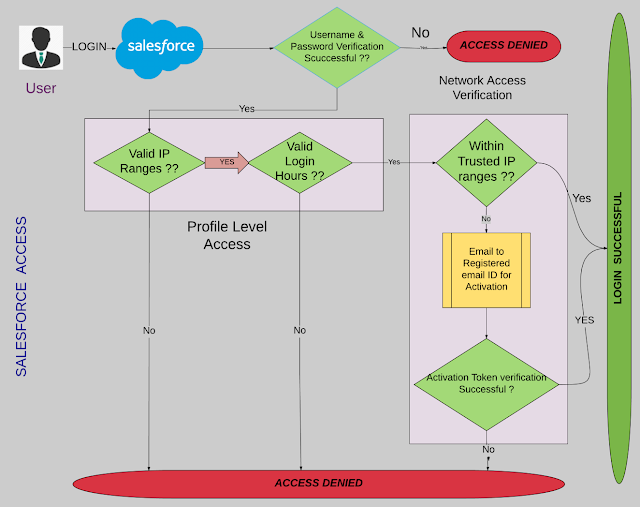
Simplest flow diagram possible to understand different Access in salesforce security model

Image
ORG Level Access Profile Level Access Record Level Access Field Level Access

Why a User can't see a record - Steps to troubleshoot via sharing architecture

 Here is a troubleshooting flow. 1. Verify that the user has permissions to access to the object. 2. Identify the user's role who can't see the record and note it. 3. Identify the owner's role of the record and note it. 4. Review the role hierarchy and verify these two roles are in two different branches (they should be). 5. Now you need to review the sharing rules for the object and make sure there is no rule that will grant the user access. This can also cause you to look in public groups as well. Maybe the user just got left out of a group where there is a sharing rule, or does it make sense to create a new sharing rule to grant the user access? This depends on the architecture you are trying to maintain, and applies to both ownership-based sharing rules and criteria-based sharing rules. 6. If you are using teams, should this user be on the team for that record? How are teams maintained and how did the miss occur? 7. If manual sharing is used, the user m...

Checking API Usage

Image
1) Below are the ways by which you can access the report to check API Usage for the organisation- a) System Overview Go to Monitor | System Overview and there you will find the API REQUESTS, LAST 24 HOURS. This shows you how many API calls you've made in the last 24 hours including today. For example, if you are viewing this on Monday at 2:30 PM, it'll show you the calls made since Sunday at 2:30 PM b) Through Salesforce Report Click the Reports tab and view the "API Usage Last 7 Days" report under the Administrative Reports folder. This will show you how many calls each app/person made in the last 7 days. shortcut step-> put this URL in for your instance.  It's how I found the API report.https:// na1 .salesforce.com//00O?rt=104&retURL=%2F00O&c=UN&c=FULL_NAME&c=EM&c=CID&c=TS&c=CC&duel0=FULL_NAME%2CUN%2CEM&scope=organization&details=yes Replace the  na1  with your instance.  c)...

How to Query all fields in Apex ( SELECT (ALL) * FROM SObject )

Hello Guys, We have situations where we need to query all fields from any SObject in salesforce and because in SOQL we have to maintain resource allocation therefore we don't have option such as to query like SELECT * FROM SObjectName like we used to have in SQL. So here is the utility method that you can use to fetch all field names for a particular SObject and return as string: Method:   public static String fetchFieldNames(String sObjectName){       String SobjectApiName = sObjectName;       Map<String, Schema.SObjectType> schemaMap = Schema.getGlobalDescribe();       Map<String, Schema.SObjectField> fieldMap = schemaMap.get(SobjectApiName).getDescribe().fields.getMap();       String commaSepratedFields = '';       for(String fieldName : fieldMap.keyset()){           if(commaSepratedFields == null || commaSepratedFields == ''){       ...

Utiity method to get week number of month by passing a Datetime value

Hi Techies, Here below is the Method that you can use in order to fetch week number in a month: for ex: Pass                ->     Result .......................................... 1July2016                 1 8July2016                 2 22July2016               4 and so on.... Method :     public Integer weekOfMonth( Datetime dateVar){                 Date currentDate = dateVar.Date();                 Integer weekCount = 0;                 Integer startWeekResidue = 0;                 Integer endWeekResidue = 0;                 //Calculating startWeekResidue           ...

Include Lightning Component in Visualforce Page

Yes, it's possible now. We can put our Lightning Component inside Visualforce page, it would help us to combine features we have built using both VF and Lightning Component. Basically we have four steps to add lightning component to a Visualforce Page. Step 1: a) Create simple lightning aura application and make it global and extend ltng:outApp , now save this app as "MyLightningApp" <aura:application access="GLOBAL" extends="ltng:outApp"> b) Create a component and save it as "MyLightningCmp". <aura: component> Test - We are inside component now!! </aura:component> Step 2: Add a dependency to our application, The app uses the <aura:dependency> tag to indicate that it uses the standard Lightning component, such as ui:button and Custom Component in our case "MyLightningApp" Note: If the app is defined in your org (that is, not in a managed package), you can use the ...
Generic Component for Loading Icon on Visualforce Pages

Image
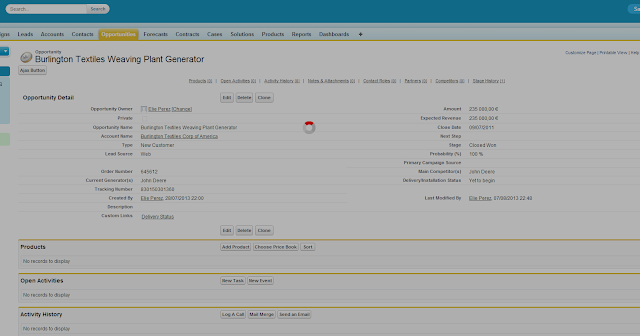
While developing a Solution using Visualforce page and Apex, we have one common requirement which is to  show loading icon  whenever user click on button/link/panel etc. Few use case to show loading icon could be:       1.    Notify user that action he asked for is in progress. 2.    Don't want user to make any change till previous action finishes. The following is the screenshot of how Loading icon would show: To achieve this, we will create a new VF Component ( Go to Setup -> Develop -> Component -> New. Name= “LoadingIcon” ) The Icon that we will be using here is standard Icon provided by salesforce, therefore no need to upload any static resource. Visualforce Component: 1 2 3 4 5 6 7 8 9 10 11 12 13 14 15 16 17 18 19 20 21 22 23 24 25 26 27 28 29 30 31 32 33 34 35 36 37 38 39 40 <apex:component ...